How to change sticky menu
Home / How to change sticky menu
Step 1 : Click on the sticky menu module on left side panel you find panel
Step 2 :
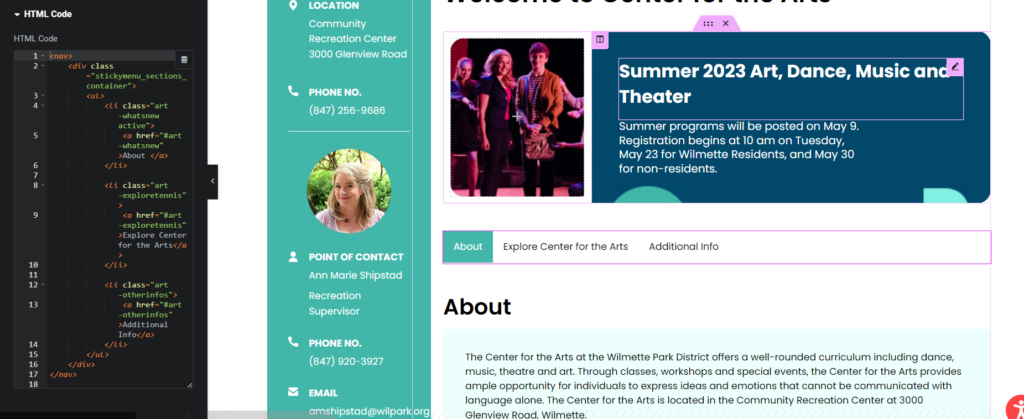
- Where we have Your title A there you will put what should be visible on the sticky bar if it is Hours then Hours
- On same line there is #your-title-a there you will give id to newly added menu item (note:it should start with # and everything will be in small case ) her you will replace #your-title-a in your case if it is hours then #hours
- Note: first item in many will have active as you can see it does by default make first element active
- where we have art-whatsnew , there just replace with page name e.g. baseball-whatsnew or swim-whatsnew
					<nav>
    <div class="stickymenu_sections_container">
        <ul>
            <li class="art-whatsnew active">
                <a href="#your-title-a">Your title A</a>
            </li>

            <li class="art-exploretennis">
                <a href="#your-title-b">Your title B</a>
            </li>

            <li class="art-otherinfos">
                <a href="#your-title-c">Your title C</a>
            </li>
        </ul>
    </div>
</nav>
Step 3 :
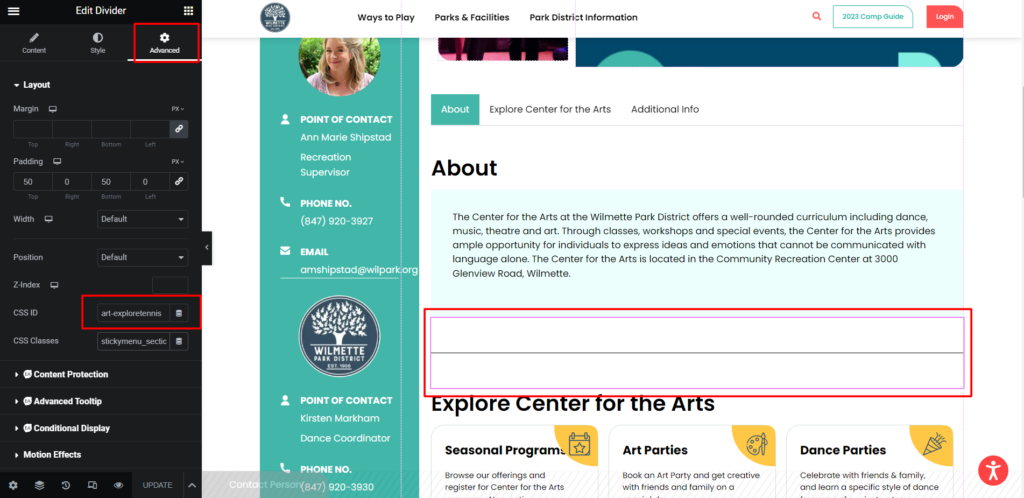
- The menu item which we created where we want to link it just above that section we will be having black divider line click on it
- once you click on it on left panel click on advance
- Below you will have id field it is not but which we created in step 1 that is #your-title-a but here will we add without # so it will be your-title-a